Microsoft is putting a lot of effort in remote desktop connectivity with the introduction of RDP Multipath for Azure Virtual Desktop (AVD). This new feature, currently in public preview, improves RDP connectivity by enabling multiple transport channels simultaneously, providing redundant connections and increasing performance and user experience over fluctuating network conditions.
While RDP Multipath is currently exclusive to AVD, it’s important to note that Windows 365, though it uses the same AVD gateway infrastructure, does not yet support this new feature.
What exactly is RDP Multipath?
RDP Multipath continues to build upon RDP shortpath for Public networks. If you don’t know what this does, I explained it fully in my blogpost called “RDP Shortpath over Public Internet, STUN and TURN Explained“.
Before the introduction of RDP Multipath, Remote Desktop Protocol relied on RDP Shortpath to optimize connectivity to your virtual desktop. RDP Shortpath attempts to establish a direct UDP connection using STUN (Session Traversal Utilities for NAT), and if that fails, it falls back to a TURN (Traversal Using Relays around NAT) relay server. These direct connections reduce the number of network hops, improving overall performance and stability.
With RDP Multipath, the same foundation is used, but instead of relying on a single UDP path, multiple parallel UDP connections are established. This creates redundancy and improves session resiliency by dynamically switching between paths when network conditions change or degrade. Currently there is only support for UDP, so if you block RDP Shortpath, you’re out of luck. Microsoft does however state that support for multiple TCP connections in RDP Multipath will become available in the future.
How does it work?
So what exactly happens?
- Initialize connection: The user connects with AVD and establishes a TCP based connection over the Azure Virtual Desktop gateway.
- RDP Shortpath: While the TCP connection is active, a direct connection between client and Session Host is being established over UDP by using STUN or TURN relay.
- RDP Shortpath: If an UDP connection is established, the TCP connection is being dropped and the connection continues to run over UDP.
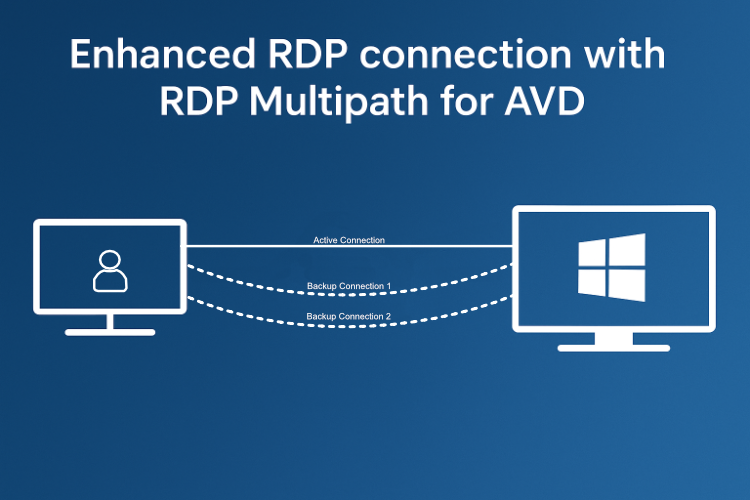
- RDP Multipath: While the primary UDP connection is active, two alternative routes over the internet are being searched to provide a redundant connection. These routes will always use alternate paths over different TURN relay servers.
- RDP Multipath: The user is now connected over UDP, and has two active failback routes which will greatly enhance failover support, especially in difficult network scenarios.
Once the multiple connections are established you can verify this in the connection information within an active session, it will show up as “Multipath (UDP/WebSocket) is enabled”.

When opening the connection details we can also see that Multipath is active. In this screenshot I’m being relayed, so using TURN.

Microsoft has provided us with a good diagram which showcases this visually:

How do you enable it?
The great news about this feature is that, once it hits General Availability (GA), it is enabled by default on Microsoft’s side. No IT intervention is needed to take advantage of it. This once again, highlights the value of using a cloud service, where new capabilities are integrated into your existing environment without having you invest additional time or resources into manual configuration.
As it currently still is in public preview, you can already test it by using the validation Host Pool feature in AVD.
If you happen to have security concerns, you can disable this as well, although not recommended, by disabling UDP connectivity. I got that written down on my “HOWTO: Disable UDP and RDP Shortpath ON a Cloud PC” blogpost, but the steps for AVD are identical.
Let’s wrap up
If you have any questions or concerns about RDP Multipath, just let me know. In most cases, it is best to use it, since there are no real drawbacks. I think it is a great new feature that shows how far Microsoft’s VDI solutions have come. Also, as a closing note, even with redundant connections, the client device, local router, or the session host can still be single points of failure, which is to be expected..




Leave a Reply